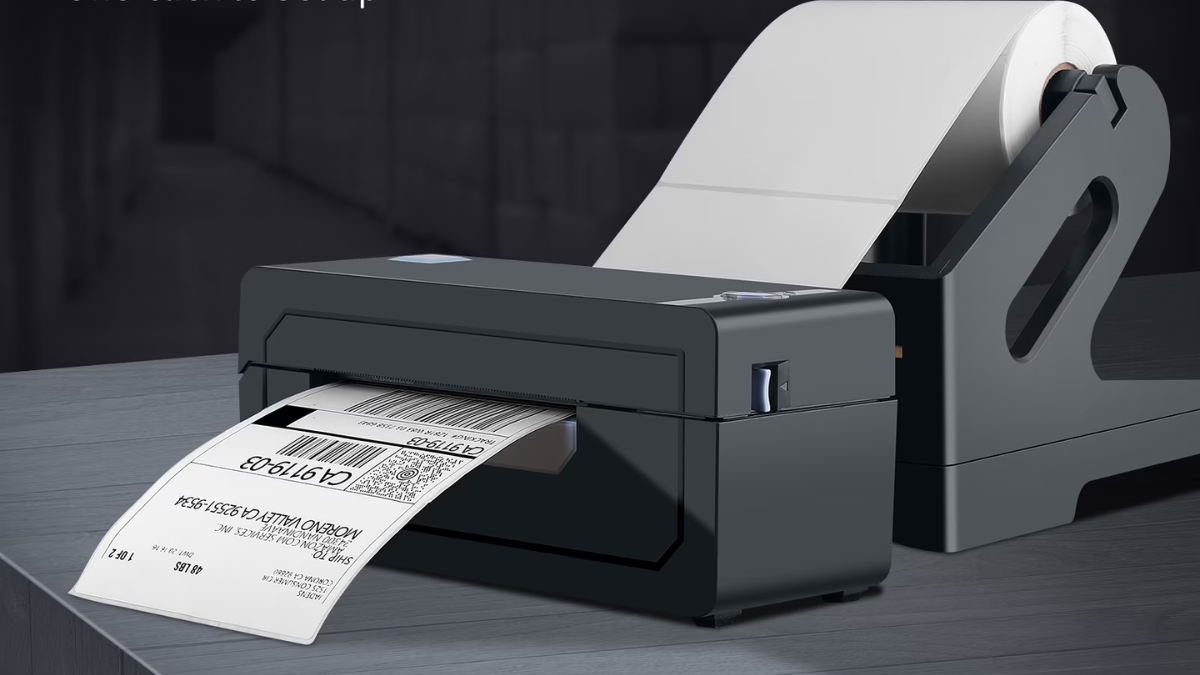
In the fast-growing world of e-commerce and online selling, efficiency matters more than ever. Whether you’re running a small shop on Shopee, Lazada, or managing a growing business from home, printing shipping labels quickly and reliably can save both time and money. This is where thermal label printers like the JADENS printer come into play.
Unlike traditional inkjet or laser printers, they use thermal technology to produce labels without ink. This makes them not only cost-effective but also highly practical for repetitive printing tasks.
A thermal label printer, primarily designed for printing shipping labels, barcodes, and stickers. Instead of using ink cartridges or toner, it relies on heat-sensitive paper. When the print head heats specific areas of the paper, it creates text and images instantly.
This means:
- No ink refills
- No messy cartridges
- Lower long-term costs
However, it also means that JADENS printers are specialized—they are not designed for printing regular documents, photos, or colored materials.
⚙️ Key Features and Specifications
Most JADENS models share a similar set of core features that make them attractive to small business owners and frequent shippers.
🖨️ Inkless Thermal Printing
The biggest advantage is the absence of ink. This eliminates one of the most common ongoing expenses associated with traditional printers. For businesses that print dozens or hundreds of labels daily, this can result in significant savings over time.
⚡ Fast Printing Speed
These are built for efficiency. They can print labels in seconds, making them ideal for bulk shipping tasks. This speed becomes especially valuable during peak seasons or sales events.
📏 Flexible Label Sizes
These printers typically support label widths from around 1.5 inches up to 4.1 inches. The most common size is 4×6 inches, which is widely used for shipping labels across major e-commerce platforms.
📱 Connectivity Options
Depending on the model, JADENS printers offer:
- USB connection (for PC and laptop use)
- Bluetooth connectivity (for mobile printing via apps)
This flexibility allows users to print directly from smartphones, tablets, or computers.
It work with:
- Windows
- macOS
- Android
- iOS
They are also compatible with major platforms like Shopee, Lazada, Shopify, eBay, and Amazon, making them highly versatile.
🚀 Performance in Real Use
📦 Shipping Labels
Printing a 4×6 shipping label is quick, clean, and consistent. The text is sharp enough for scanning barcodes, which is crucial for logistics.
🏷️ Barcode and Inventory Labels
For businesses managing inventory, they provide a reliable way to print barcodes and product labels. The 203 DPI resolution is sufficient for clear, readable output.
📱 Mobile Printing
Bluetooth-enabled models allow printing directly from a smartphone app. This is convenient for sellers who manage their business primarily through mobile devices.
👍 Advantages
Without the need for ink or toner, operational costs are significantly reduced. Thermal paper is relatively affordable, especially when purchased in bulk.
⏱️ Time-Saving
Fast printing speeds and easy setup mean you spend less time dealing with printing issues and more time focusing on your business.
🔌 Easy Setup
Most printers are plug-and-play. Even for Bluetooth models, setup is straightforward using the companion app.
📦 Compact Design
These printers are small and lightweight, making them suitable for home offices or limited workspaces.
👎 Limitations
⚫ Black-and-White Only
Thermal printers can only print in black. If you need color labels or images, this is not the right device.
📄 Not for General Printing
These are not designed for documents like reports, essays, or photos. You will still need a traditional printer for those tasks.
🧾 Requires Thermal Paper
You must use special thermal labels. Regular paper will not work, which means you need to maintain a supply of compatible materials.
🔧 Build Quality
While functional, the build quality is often described as basic. It’s durable enough for normal use but may not feel as premium as higher-end brands.
🧑💼 Who Should Use a JADENS Printer?
🛍️ Online Sellers
This is a game-changer. It simplifies the shipping process and reduces costs.
📦 Small Business Owners
Businesses that frequently ship products or manage inventory will benefit from the speed and efficiency of thermal printing.
🏠 Home-Based Entrepreneurs
For those running a business from home, the compact size and ease of use make it an excellent addition to a workspace.
🚫 Who Should Avoid It?
Despite its advantages, this is not suitable for everyone.
You should consider alternatives if you:
- Need to print school documents or office reports
- Want color printing capabilities
- Require photo-quality output
- Prefer an all-in-one printer for multiple tasks
⚖️ Comparison with Traditional Printers
| Feature |
JADENS Thermal Printer |
Inkjet/Laser Printer |
| Ink Required |
❌ No |
✔ Yes |
| Color Printing |
❌ No |
✔ Yes |
| Best Use |
Labels, barcodes |
Documents, photos |
| Maintenance |
Low |
Moderate to high |
| Speed (labels) |
Fast |
Moderate |
This comparison highlights that they are specialized tools, not replacements for traditional printers.
💰 Price and Value
While the upfront cost may seem higher than basic inkjet printers, the long-term savings on ink make it a cost-effective investment—especially for businesses.
🧠 Tips Before Buying
Consider the following:
- Choose a Bluetooth model if you prefer mobile printing
- Ensure compatibility with your operating system
- Buy high-quality thermal labels to avoid printing issues
- Check platform integration (Shopee, Lazada, etc.)
🔚 Final Verdict
The JADENS printer is a practical and efficient solution for anyone who regularly prints labels. It eliminates the need for ink, reduces operating costs, and speeds up the workflow for shipping and inventory tasks.
While it’s not a replacement for a traditional printer, it excels in its niche. For online sellers and small businesses, it can significantly streamline operations and improve productivity.