In the world of remote work, online learning, and content creation, having a reliable webcam is no longer optional—it’s essential. While laptops and monitors often come with built-in cameras, their quality tends to fall short, especially in terms of clarity, color accuracy, and low-light performance. offering a significant upgrade without requiring a premium budget.
📦 Overview and First Impressions
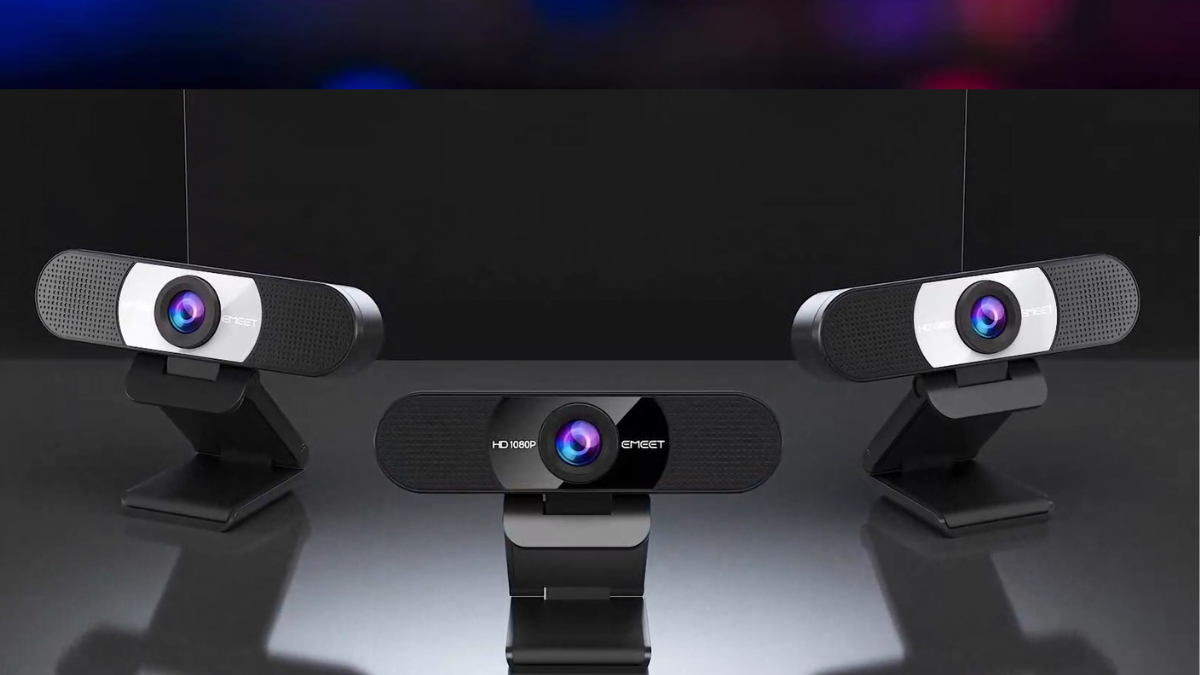
The EMEET Webcam is positioned as an affordable yet capable webcam designed for everyday users. It targets professionals working from home, students attending virtual classes, and even casual content creators who want better video quality without spending a fortune.
Right out of the box, the webcam feels practical and straightforward. It features a compact design with a built-in mounting clip that easily attaches to monitors or laptops. There’s also a privacy cover included, which is a small but important feature for users concerned about security.
Unlike complicated camera setups, this is plug-and-play, meaning you can simply connect it via USB and start using it immediately without installing drivers.
🎥 Video Quality and Performance
The main selling point of this webcam is its 4K resolution capability at 30 frames per second (fps). In real-world usage, this translates to noticeably sharper video compared to standard 720p or 1080p webcams.
Clarity and Detail
The webcam uses a Sony sensor, which is known for producing crisp and detailed images. Whether you’re in a business meeting or recording content, the clarity is sufficient to make your face look sharp and professional.
However, it’s important to note that not all apps support 4K streaming. Platforms like Zoom or Google Meet may default to 1080p unless manually configured or unless your subscription allows higher resolutions.
The autofocus is fast and reliable thanks to its PDAF (Phase Detection Autofocus) technology. It adjusts quickly when you move closer or farther from the camera, making it suitable for dynamic situations like presentations or casual streaming.
Field of View
The 73-degree field of view is somewhat narrower than other webcams. This works well for solo users because it keeps the focus on your face without capturing too much background. However, it’s not ideal for group calls or wide shots.
💡 Low-Light Performance
One of the common problems with webcams is poor performance in low-light conditions. Addresses this with automatic light correction.
In dim environments, the camera adjusts brightness and exposure to keep your face visible. While it doesn’t perform miracles in very dark rooms, it still delivers better results than most built-in laptop cameras.
If you pair it with a simple ring light or desk lamp, the video quality improves significantly.
The webcam comes with dual noise-canceling microphones, which is a strong feature at this price point.
These microphones:
- Reduce background noise (like fans or typing)
- Capture your voice clearly from a reasonable distance
- Eliminate the need for a separate mic in casual setups
For professional streaming or recording, a dedicated microphone is still recommended, but for meetings and online classes, the built-in audio is more than sufficient.
🔌 Ease of Use and Compatibility
One of the biggest advantages is its simplicity.
Plug-and-Play Setup
You just plug it into a USB port, and your computer recognizes it instantly. No drivers, no complicated software—just select it as your camera in your preferred app.
Compatibility
It works with:
And it integrates seamlessly with platforms like:
- Zoom
- Microsoft Teams
- Google Meet
- Skype
- OBS (for streaming)
This makes it a versatile option for almost any user.
🔒 Privacy and Build Features
Privacy is a growing concern, and they addresses this by including a physical privacy cover. This allows you to block the camera lens when it’s not in use, ensuring peace of mind.
The build quality is decent for the price. While it’s not premium metal construction, it feels durable enough for daily use.
⚖️ Pros and Cons
👍 Pros
- Affordable 4K resolution
- Sharp image quality with Sony sensor
- Reliable autofocus
- Good built-in microphones
- Plug-and-play convenience
- Includes privacy cover
👎 Cons
- Limited to 30fps in 4K
- Narrow field of view
- No advanced AI features (like auto framing or tracking)
- Performance depends on lighting conditions
🧑💻 Who Is It For?
This is best suited for:
If you attend frequent meetings, this webcam ensures you look clear and professional.
Students
Online classes become more engaging when your video quality is sharp and stable.
Casual Content Creators
If you’re starting out on YouTube or streaming, this webcam offers a good balance of quality and affordability.
Everyday Users
Even for casual video calls with friends and family, it’s a noticeable upgrade.
🚫 Who Should Skip It?
Despite its strengths, the webcam isn’t for everyone.
You might want to consider other options if you:
- Need 60fps video for gaming or fast motion
- Require a wide-angle lens for group calls
- Want AI-powered tracking or framing features
- Are a professional streamer needing top-tier performance
💰 Value for Money
When compared to more expensive brands, it offers:
- Comparable image clarity
- Reliable performance
- Essential features without unnecessary extras
This makes it an excellent value-for-money option, especially for users upgrading from built-in laptop cameras.
🧠 Final Verdict
The EMEET Webcam strikes a strong balance between performance, simplicity, and affordability. It doesn’t try to compete with high-end webcams packed with AI features, but it delivers where it matters most—clear video, decent audio, and reliable operation.
For most users, it represents a practical upgrade that significantly improves video quality without complicating the setup.
If your goal is to look better on camera, communicate clearly, and keep things simple, this webcam is a smart and cost-effective choice.