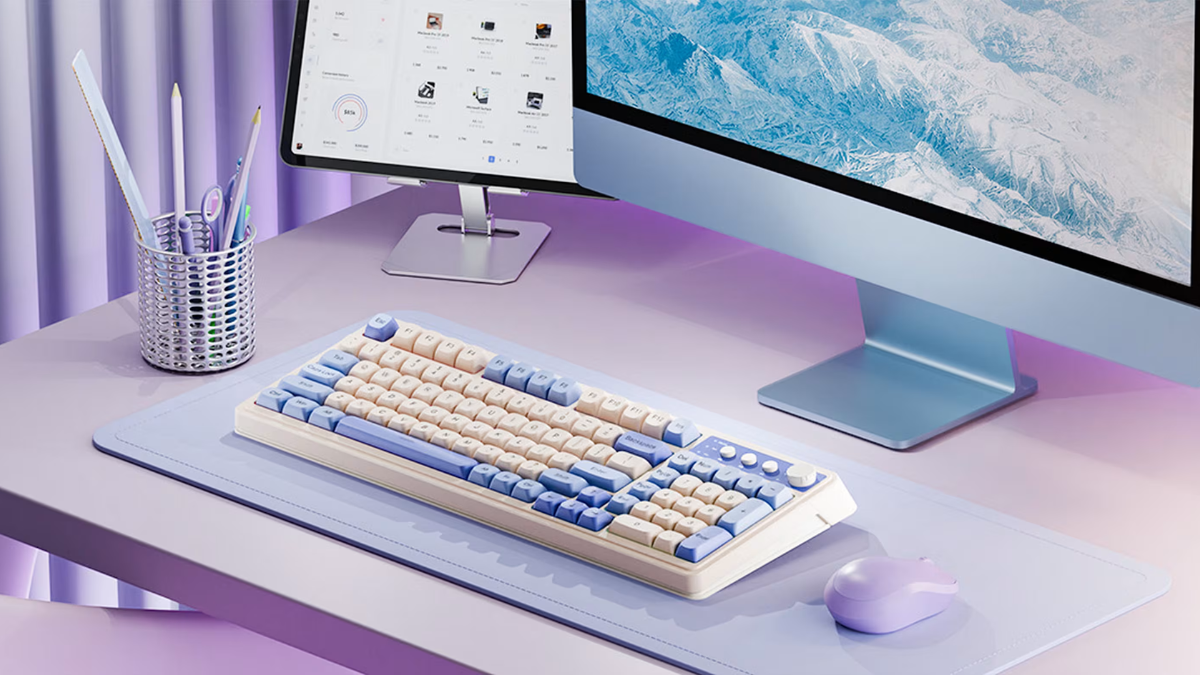
A gaming keyboard is more than a device for typing commands. For gamers, it can become one of the most important parts of a computer setup. The keyboard affects how quickly commands are registered, how comfortable long gaming sessions feel, and how easily users can customize their setup. The AULA Gaming Keyboard has attracted attention among gamers looking for feature-rich keyboards without necessarily moving into the highest price categories.
They offers a range of gaming keyboards with different layouts, switch types, connection options, lighting systems, and customization features. Because specifications vary between models, buyers should always check the exact product version before purchasing. Nevertheless, many AULA keyboards share a focus on mechanical-style performance, customizable RGB lighting, programmable controls, and gaming-oriented design.
What Is an AULA Gaming Keyboard?
A gaming peripheral brand that produces keyboards, mice, headsets, and other accessories designed for computer users and gamers. Its keyboards are available in several form factors, from compact models to larger full-size designs.
The main purpose is to provide responsive input for gaming while remaining practical for everyday activities such as browsing, schoolwork, and office tasks.
Different models can offer different combinations of mechanical switches, wireless connectivity, hot-swappable sockets, multimedia controls, and RGB lighting. This variety allows users to choose a keyboard based on their budget and preferences rather than requiring everyone to use the same design.
Mechanical Switches and Typing Feel
One of the most important features of a gaming keyboard is the switch system.
Mechanical keyboards use individual switches beneath the keys. These switches determine how a key feels and sounds when pressed. Depending on the model, it may use linear, tactile, or other mechanical switch designs.
Linear switches generally provide a smooth keypress without a noticeable bump. They can be appealing to gamers who prefer rapid and consistent key movement.
Tactile switches provide a noticeable bump during the keypress. Some users enjoy this feedback because it can make typing feel more deliberate.
The ideal switch ultimately depends on personal preference. A gamer who enjoys fast, smooth inputs may prefer a linear switch, while someone who spends considerable time typing may appreciate tactile feedback.
Gaming Performance
For gaming, responsiveness is a major consideration. A keyboard needs to register commands reliably and quickly, particularly in competitive games where timing can matter.
These are designed with gaming-oriented performance in mind. Features such as mechanical switches, anti-ghosting, and key rollover can help ensure that multiple inputs are recognized correctly.
Anti-ghosting is particularly useful when several keys are pressed simultaneously. Without effective anti-ghosting technology, some keyboards may fail to recognize certain combinations of inputs.
For genres such as first-person shooters, real-time strategy games, fighting games, and multiplayer online games, reliable simultaneous key registration can contribute to a smoother experience.
However, keyboard performance is only one part of gaming. Internet connection, computer hardware, game settings, monitor refresh rate, and individual skill also influence gameplay.
RGB Backlighting
RGB lighting has become one of the most recognizable features of gaming keyboards.
Many AULA models include customizable RGB illumination, allowing users to change lighting effects and colors. Depending on the model and software support, users may be able to select different patterns, brightness levels, or static colors.
RGB lighting is primarily an aesthetic feature, but it can also be practical. Backlighting makes it easier to see keys in darker environments.
For gamers who enjoy creating coordinated setups, RGB lighting can complement a gaming mouse, headset, desk lighting, and computer case.
Users should remember, however, that RGB capabilities vary between models. Some keyboards offer extensive software customization, while others provide a more limited selection of built-in effects.
Customization and Software
Customization is another reason gamers choose dedicated gaming keyboards.
Depending on the model, an they may allow users to configure lighting, key functions, macros, and other settings through companion software.
Programmable keys can be particularly useful in games that involve repetitive commands. A user may assign a frequently used function to a dedicated key rather than relying entirely on standard keyboard combinations.
Software customization can also be useful outside gaming. Users may assign shortcuts for applications, media controls, or frequently used commands.
The exact software experience depends on the keyboard model, so buyers interested in advanced customization should check whether their chosen model supports the required features.
Wireless and Wired Connectivity
Wired keyboards are popular among competitive gamers because they offer a direct connection and eliminate the need to manage battery charging.
Wireless keyboards, however, provide greater flexibility. They can reduce cable clutter and make it easier to move the keyboard around a desk.
Some modern gaming keyboards combine multiple connection methods, potentially including wired USB, Bluetooth, and dedicated wireless connections. This can make a keyboard more versatile because the same device can be used with a gaming PC, laptop, or other compatible device.
Users should choose connectivity based on how they intend to use the keyboard rather than simply selecting the option with the most features.
Hot-Swappable Switches
A hot-swappable keyboard allows users to replace compatible mechanical switches without soldering. This can be valuable for people who want to experiment with different switch types.
For example, a user might initially choose a smooth linear switch and later decide that a tactile switch would be more comfortable for typing.
Hot-swappable designs also provide a potential upgrade path. Instead of replacing the entire keyboard when a user wants a different typing feel, compatible switches can be changed individually.
Different Keyboard Sizes
Keyboard size can significantly affect how a gaming setup feels.
A full-size keyboard includes the traditional number pad and is useful for people who frequently work with numbers. It can also be convenient for office tasks.
Tenkeyless keyboards remove the number pad, creating more space for mouse movement. This layout is popular among gamers who want a more compact desk setup.
Compact keyboards can remove additional keys and reduce the overall footprint even further. These models are attractive to users who prioritize portability and desk space.
AULA offers different keyboard formats, allowing users to select the layout that fits their preferences.
Comfort During Long Sessions
Gaming sessions can last for several hours, making comfort an important consideration.
A good keyboard should provide a comfortable typing angle and stable key placement. Some AULA models include adjustable feet or ergonomic design features that allow users to change the keyboard’s angle.
Keycap shape and spacing can also affect comfort. Users who type frequently may prefer a keyboard with a familiar layout and comfortable keycaps.
However, comfort is highly subjective. The keyboard that feels perfect to one person may not suit another. If possible, users should test the keyboard or carefully review its dimensions and layout before purchasing.
Build Quality and Design
Gaming keyboards often need to withstand thousands or even millions of keypresses. Build quality is therefore an important consideration.
The vary in construction depending on the model and price range. Some emphasize lightweight designs, while others use heavier cases or additional structural components.
A sturdy keyboard is less likely to move around the desk during intense gaming sessions. Key stability can also affect typing and gaming comfort.
The visual design is another consideration. They often feature gaming-inspired aesthetics, which can complement modern gaming setups.
AULA for Gaming and Productivity
They are marketed toward gamers, they can also be used for everyday productivity.
Mechanical switches can provide a satisfying typing experience for writing, programming, browsing, and office work. Programmable keys can also improve productivity by providing shortcuts.
A wireless model can be particularly useful for people who switch between gaming and work devices.
This versatility makes a gaming keyboard potentially more useful than a device purchased exclusively for gaming.
Advantages of an AULA Gaming Keyboard
They can offer several advantages depending on the model.
First, the brand provides a variety of keyboard sizes and configurations. This allows buyers to choose between full-size, compact, and other layouts.
Second, many models focus on gaming-friendly features such as mechanical switches, RGB lighting, anti-ghosting, and customizable controls.
Third, some models offer hot-swappable switches, which can appeal to keyboard enthusiasts who enjoy customization.
Fourth, wireless models can provide greater flexibility and reduce cable clutter.
Finally, they can appeal to buyers who want enthusiast-style features without necessarily purchasing a premium keyboard from one of the most expensive gaming brands.
Potential Disadvantages
There are also potential limitations.
They produces many different models, the quality, software features, switches, and connectivity options can vary considerably. A positive experience with one model should not automatically be assumed to apply to every AULA keyboard.
Software compatibility and customization can also differ between products. Buyers who need specific macro or lighting features should confirm compatibility before purchasing.
Another consideration is switch preference. A keyboard may be excellent technically but still feel uncomfortable if its switches do not match the user’s typing style.
Who Should Buy an AULA Gaming Keyboard?
They can be a good option for gamers who want mechanical-style performance, customizable lighting, and modern features.
It may be particularly attractive to people building their first gaming setup or upgrading from a basic membrane keyboard.
Keyboard enthusiasts may also appreciate models with hot-swappable switches and extensive customization.
For competitive gamers, the most important considerations should be switch performance, layout, connectivity, and reliability rather than appearance alone.
For casual gamers, RGB lighting, wireless connectivity, and overall design may carry greater importance.
How to Choose the Right Model
Start with the layout. Decide whether you need a number pad or prefer a smaller design.
Next, consider switch type. Linear, tactile, and other switches provide different experiences.
Then evaluate connectivity. Choose wired if you prioritize simplicity and a direct connection, or wireless if reducing cables is important.
Check whether the keyboard supports hot-swappable switches if you plan to customize it.
Finally, look at software, RGB controls, key rollover, build quality, and warranty coverage.
Price should also be considered alongside these features. The most expensive keyboard is not automatically the best choice for every gamer.
Final Verdict
The range offers a variety of options for gamers and everyday computer users who want more functionality than a basic keyboard can provide. Depending on the model, users can find features such as mechanical switches, RGB lighting, wireless connectivity, programmable controls, anti-ghosting, and hot-swappable switches.
Its biggest strength is variety. Instead of targeting only one type of gamer, they provides different layouts and feature combinations for different needs.
At the same time, buyers should carefully research the exact model because specifications can vary significantly between keyboards.