Webcams have become essential tools for communication, education, business, and entertainment. From attending online meetings to participating in virtual classes and creating content, people increasingly rely on cameras to present themselves clearly on screen. Although many laptops have built-in webcams, their image quality and flexibility may not always meet the needs of users who want a more professional video experience. This is designed to address these needs by offering advanced imaging features, convenient connectivity, and versatile mounting options.
The Logitech Brio lineup includes different models, with the Brio 4K being a well-known option for users seeking high-resolution video. Its combination of autofocus, automatic light correction, adjustable viewing angles, and integrated microphones makes it suitable for various applications.
Design and Build Quality
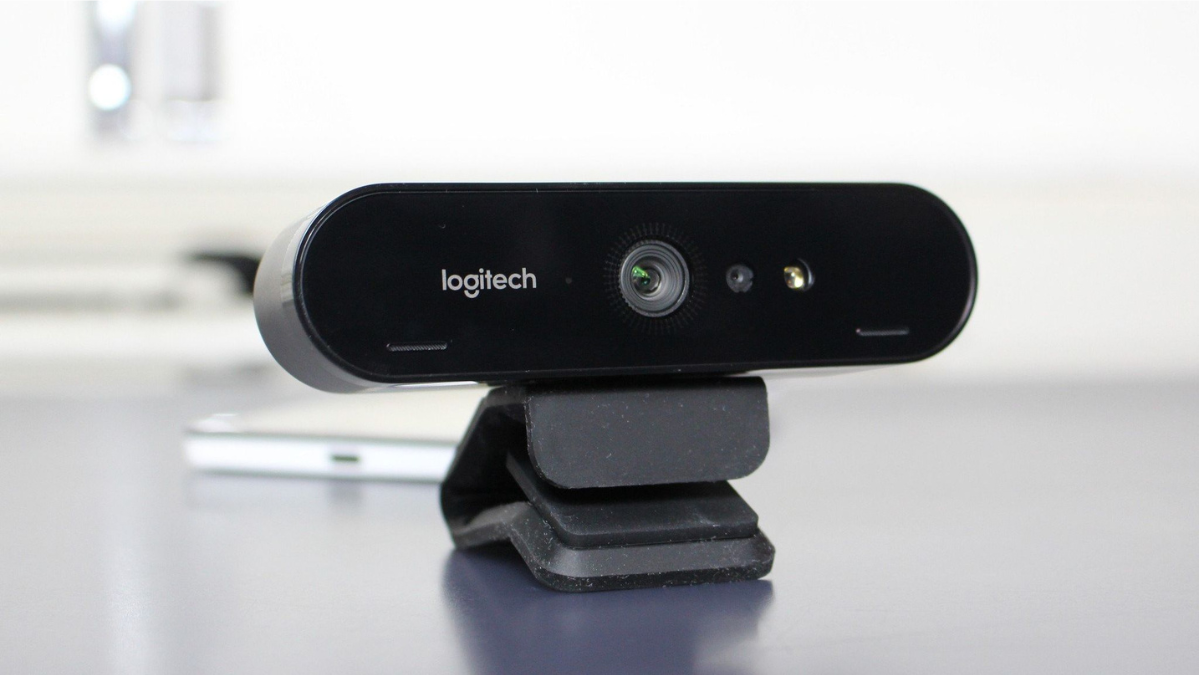
Features a compact design that fits comfortably into modern workspaces. Its small size makes it suitable for home offices, corporate desks, study areas, and streaming setups. Rather than requiring a large amount of desk space, the webcam can be positioned above a compatible monitor or laptop screen.
The Brio 4K model includes a mounting clip that helps secure the camera to a display. It also supports tripod mounting, providing additional flexibility for users who prefer a different camera position. This versatility is useful for presentations, video recording, and online meetings where camera placement can influence the overall appearance of the video.
Its understated design complements a wide range of computer setups. The compact construction also makes it relatively easy to reposition when changing workstations. However, users should ensure that the mounting clip is secure before adjusting the camera.
High-Resolution Video Quality
One of the most notable features is its ability to capture video at resolutions up to 4K at 30 frames per second. It also supports Full HD 1080p at up to 60 frames per second and HD 720p at up to 90 frames per second, subject to application and system support.
Higher resolution can reveal finer details, helping users appear clearer during video calls and recordings. This can be valuable for business presentations, remote consultations, online teaching, and content creation.
However, recording or streaming in 4K is not necessary for everyone. Many video conferencing platforms compress video or limit the resolution available during calls. Internet bandwidth, computer performance, application settings, and the recipient’s display can also affect the final image.
For everyday meetings, 1080p may provide an excellent balance between image quality and performance. Users who regularly record high-quality videos or need additional image detail may benefit more from the 4K capability.
Autofocus and Image Clarity
The Logitech Brio 4K includes autofocus technology that helps keep the subject in focus as conditions change. This feature can be particularly helpful when a user moves slightly during a meeting or brings an object closer to the camera to demonstrate something.
Autofocus reduces the need for constant manual adjustments and contributes to a more convenient recording experience. Combined with its high-resolution sensor and glass lens, it helps produce detailed images when lighting and camera positioning are appropriate.
Image quality nevertheless depends on more than the webcam itself. A clean lens, suitable camera distance, stable mounting, and adequate lighting all contribute to a clear result.
Automatic Light Correction
Lighting is an important factor in webcam performance. A camera may produce dark, washed-out, or uneven images when the room is poorly lit or when bright light comes from behind the user.
They uses Logitech RightLight 3 with HDR to help adjust the image under different lighting conditions. This technology is designed to improve visibility in situations involving low light, bright backgrounds, and high contrast.
For remote workers, this can be useful when attending meetings from a home office with changing daylight. Students can also benefit when studying or participating in online classes in rooms that do not have professional lighting equipment.
Although automatic light correction can improve the image, it cannot completely replace good lighting. Placing a light source in front of the user, avoiding strong backlighting, and keeping the surrounding area reasonably bright can help achieve better results.
Field of View and Digital Zoom
They offers three diagonal field-of-view settings: 65, 78, and 90 degrees. These options allow users to control how much of their surroundings appears in the frame.
The narrower 65-degree setting is useful for individual meetings because it focuses more closely on the speaker. The 78-degree setting offers a balanced view, while the wider 90-degree setting can capture more of the room or accommodate multiple people.
The webcam also supports up to five-times digital zoom. This feature allows users to enlarge a particular area of the image without physically moving the camera.
These controls can make the Brio adaptable to different environments. However, digital zoom crops and enlarges the image rather than providing the same benefit as optical zoom. Excessive zoom may reduce perceived image detail.
Clear communication requires good audio as well as good video. They includes two integrated omnidirectional microphones designed to capture voices from different directions. Logitech specifies a microphone pickup range of up to approximately 1.2 meters for this model.
The built-in microphones are convenient because users can participate in meetings without purchasing a separate microphone immediately. They can be suitable for routine video calls, online classes, and conversations with colleagues.
However, microphone performance depends on the surrounding environment. Keyboard noise, fans, traffic, and conversations nearby can affect sound quality. Users who produce podcasts, professional videos, or other audio-focused content may prefer a dedicated microphone or headset.
Connectivity, Compatibility, and Privacy
It connects through USB and supports USB-A connectivity, with USB-C use possible through a suitable adapter where required. Its plug-and-play design makes setup relatively straightforward on compatible computers.
The webcam works with supported Windows, macOS, and ChromeOS systems and is compatible with many popular video conferencing applications. Users should verify the specific requirements of their operating system and preferred software before purchasing.
Another useful feature is the included attachable privacy shutter. Covering the camera lens when it is not in use provides a simple physical privacy measure. Also supports Windows Hello facial recognition on compatible Windows computers, allowing supported users to sign in conveniently.
These features make the webcam useful for people who value both ease of use and privacy.
Benefits for Work, Study, and Content Creation
They can serve a variety of users. Professionals may use it for remote meetings, interviews, presentations, and collaboration. Its adjustable framing and automatic light correction can help create a more polished appearance during calls.
Students can use it for online classes, virtual presentations, and group discussions. Content creators may appreciate its resolution options, autofocus, and mounting flexibility when recording tutorials, demonstrations, or educational videos.
Small businesses can also benefit from a dedicated webcam when conducting online consultations or communicating with customers. The camera’s versatility allows it to support different tasks without requiring a complicated setup.
Nevertheless, users should consider whether the premium features are necessary for their needs. Someone who mainly attends occasional video calls may be satisfied with a more affordable Full HD webcam.
Potential Limitations
Despite its advantages, the Logitech Brio 4K has several considerations. First, its advanced features may come at a higher price than basic webcams. Buyers should compare its capabilities with less expensive alternatives before making a decision.
Second, 4K recording requires compatible software, sufficient computer resources, and appropriate bandwidth for online streaming. Not every video conferencing service delivers calls at the camera’s maximum resolution.
Third, the built-in microphones may not provide the same sound quality as specialized audio equipment. Users working in noisy environments may need additional accessories.
Finally, some camera settings require Logitech software, and compatibility can vary by operating system and model. Checking the official product specifications can help buyers avoid unexpected limitations.
Conclusion
A versatile camera designed to improve video communication for professionals, students, and content creators. The Brio 4K model stands out for its high-resolution video, autofocus, RightLight 3 with HDR, adjustable field of view, integrated microphones, and flexible mounting options.
These features can make online meetings more convenient and recordings more detailed. Its privacy shutter and Windows Hello support on compatible systems also provide practical benefits.
However, the best webcam depends on the user’s budget, computer setup, lighting conditions, and intended use. While the Brio 4K is worth considering for people who need advanced imaging capabilities, a simpler webcam may be sufficient for basic communication.