In today’s digital world, laptops have become essential tools for students, professionals, remote workers, and content creators. Whether working from home, studying for exams, attending online meetings, or enjoying entertainment, many people spend several hours each day using their laptops. However, working directly on a desk with a laptop can sometimes lead to uncomfortable viewing angles, poor posture, and neck or shoulder strain. This is where a laptop stand can make a difference.
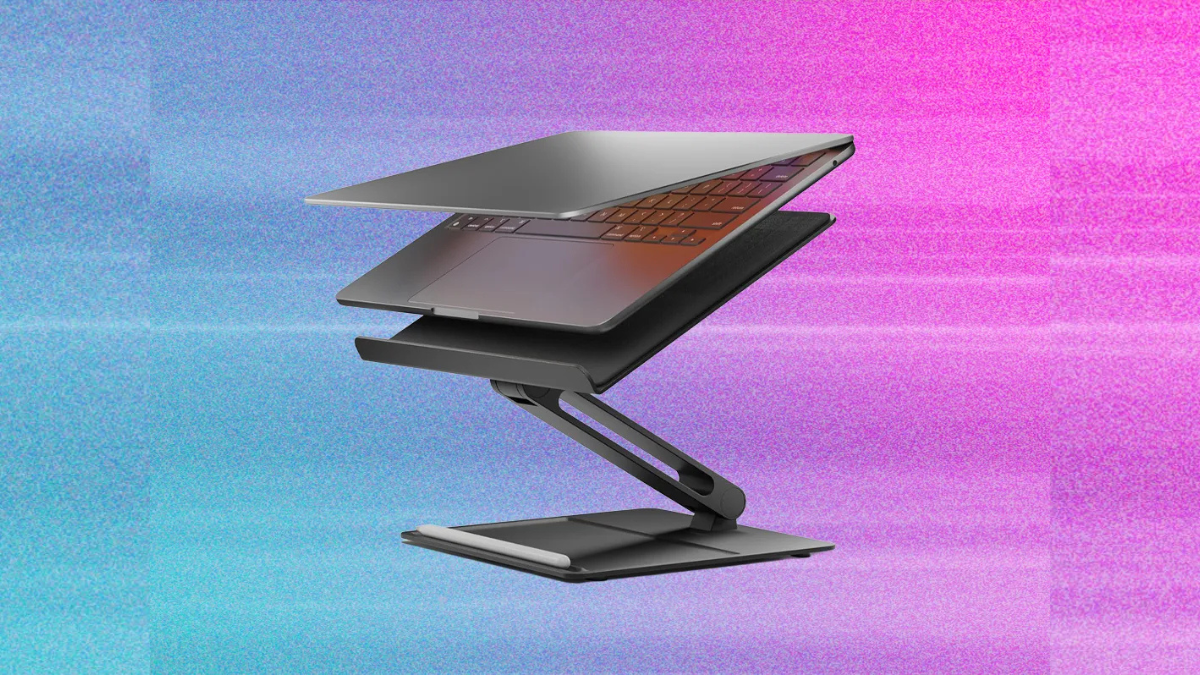
The Tounee Laptop Stand is an accessory designed to improve the laptop user’s workspace by raising the screen to a more comfortable height. Depending on the model, it may offer adjustable height, a rotating base, and a sturdy platform. These features can help users create a more organized and flexible workstation. This article explores the design, features, benefits, limitations, and practical uses of the Tounee Laptop Stand.
Design and Build Quality
One of the main considerations when choosing a laptop stand is its design. A good stand should be strong enough to support a laptop while remaining attractive and practical for everyday use. Tounee laptop stands are known for designs that emphasize adjustability and functionality, with selected models featuring a metal construction and a modern appearance.
The minimalist design can complement different work environments, including home offices, school desks, and professional workspaces. A clean design also helps keep the desk looking organized rather than crowded with unnecessary accessories.
Build quality is particularly important because the stand must support the laptop securely. A well-constructed stand should remain stable during typing and ordinary adjustments. However, construction materials, weight capacity, and stability may vary between models, so buyers should check the specifications of their chosen version before purchasing.
Adjustable Height and Viewing Angle
A major advantage of an adjustable laptop stand is the ability to position the screen at a more suitable height. When a laptop sits flat on a desk, the screen may be too low for comfortable viewing. Users often bend their necks downward, especially when working for long periods.
They can help address this issue by elevating the laptop screen. Depending on the model, users may adjust the stand’s height and tilt to suit their desk, chair, and preferred working position.
A higher screen can encourage a more neutral head and neck position. Ideally, the top of the display should be near eye level, although the best position depends on the user’s height, screen size, and seating arrangement.
It is important to remember that raising a laptop does not automatically create a fully ergonomic workstation. When the laptop is elevated, its keyboard may become less comfortable to reach. Pairing the stand with an external keyboard and mouse can make typing and navigation easier.
The Convenience of a Rotating Base
Some models feature a rotating base that allows the laptop to turn without requiring the entire stand to be lifted and repositioned. This feature can be especially useful in shared workspaces and collaborative environments.
For example, a student working on a group project can rotate the laptop screen toward classmates to show a presentation or document. During an office meeting, a user can turn the display toward a colleague without moving other items on the desk.
The rotating feature may also be convenient for people who regularly switch between tasks. Instead of moving the laptop repeatedly, users can adjust its direction as needed.
However, the presence and range of rotation depend on the particular model. Buyers should verify the product description to determine whether the version they are considering includes a rotating mechanism.
Benefits for Students and Professionals
They can be useful for different types of users. Students may use it while attending online classes, researching assignments, writing reports, or studying at home. Raising the screen can make digital learning more comfortable, particularly when a laptop is used for several hours.
Professionals can benefit from a more organized desk setup. Remote workers, office employees, programmers, and writers may appreciate being able to position their screens at a convenient height. A rotating stand can also make it easier to share information during conversations or video meetings.
Content creators may find a stand useful when editing photographs, writing scripts, managing social media accounts, or performing other computer-based tasks. A properly positioned screen can improve viewing comfort and help users maintain a consistent workspace.
Nevertheless, the stand does not replace good working habits. Regular breaks, appropriate lighting, and a comfortable chair remain important parts of a healthy workstation.
A laptop stand can contribute to a cleaner and more organized desk. By lifting the laptop above the desk surface, it can create additional usable space beneath the device, depending on the stand’s design and height.
This space may be used for storing a keyboard when it is not in use or keeping small accessories organized. Users who connect their laptops to external monitors and peripherals may also benefit from a designated place for their computers.
A more organized workspace can make everyday tasks feel simpler. Instead of constantly moving a laptop to create room for notebooks, documents, or other equipment, users can arrange their desk around a consistent workstation layout.
However, a stand’s actual space-saving benefits depend on its footprint, base design, and adjustment range. It is worth checking its dimensions before purchasing, particularly if the available desk space is limited.
Compatibility and Laptop Support
Users should confirm that the selected model is compatible with their laptops. Screen size alone is not always enough to determine compatibility. The laptop’s weight, dimensions, base shape, and the stand’s support surface should also be considered.
The stand should hold the laptop securely without excessive movement. Users should follow the manufacturer’s instructions regarding maximum supported weight and recommended use.
It is also helpful to check whether the stand leaves sufficient space for ventilation. Laptops release heat during operation, and obstructing ventilation openings may interfere with cooling. A stand should be positioned so that the laptop’s air intake and exhaust areas remain unobstructed.
Because different Tounee models may have different dimensions and specifications, buyers should not assume that every model supports every laptop.
Potential Limitations
Although a laptop stand offers several advantages, it may not be suitable for every situation. One possible limitation is portability. A sturdy adjustable stand may be heavier or bulkier than a simple foldable model, making it less convenient for users who frequently travel between classrooms, offices, and coffee shops.
Another consideration is typing comfort. Once a laptop is elevated, typing directly on its built-in keyboard may require an awkward arm position. An external keyboard and mouse can help, but these accessories add cost and require additional desk space.
Price is another factor. Buyers should compare the features, materials, warranty, and stability of the Tounee model with alternative laptop stands before deciding whether it offers good value.
Finally, adjustable joints and rotating mechanisms should be handled according to the manufacturer’s instructions. Proper use can help maintain stability and reduce unnecessary wear.
Maintenance and Care
Taking care of a laptop stand can help preserve its appearance and functionality. Regularly wiping the surface with a soft cloth can remove dust and fingerprints. For metal surfaces, users should follow the manufacturer’s cleaning recommendations and avoid harsh chemicals that could damage the finish.
It is also sensible to inspect the adjustment joints and base occasionally. If the stand develops unusual looseness, instability, or difficulty adjusting, users should stop relying on it until the issue has been checked.
When repositioning the laptop, users should support the device and avoid applying excessive force to the stand. These simple habits can help keep the workstation safe and reliable.
Conclusion
The Tounee Laptop Stand can be a practical addition to a home, school, or office workspace. Its key potential advantages include an elevated viewing position, adjustable positioning, and, on selected models, a rotating base. These features can support a more organized desk and make it easier to share a screen or adapt a workstation to different tasks.
However, choosing the right model requires careful consideration of compatibility, stability, portability, and price. Users should also remember that a laptop stand works best as part of a complete ergonomic setup, especially when paired with an external keyboard and mouse.