In today’s digital world, having reliable storage is essential for keeping important files, photos, videos, documents, and applications safe and accessible. Whether you are a student, professional, content creator, gamer, or everyday computer user, running out of storage space can become frustrating. Fortunately, solid-state drives (SSDs) offer a convenient solution for storing and accessing digital information. One recognized brand in this category is SanDisk, which offers a variety of SSD products designed for different storage needs.
These are popular among users who want faster file transfers, portable storage, and dependable performance. Compared with traditional hard disk drives (HDDs), SSDs use flash memory instead of moving mechanical parts. This allows them to deliver faster data access, quieter operation, and better resistance to physical movement.
A solid-state storage device designed to store digital information using NAND flash memory. Unlike traditional hard drives, which rely on spinning disks and mechanical read-and-write components, SSDs access information electronically.
This technology allows SSDs to provide faster file access, quicker boot times, and improved responsiveness when opening applications or transferring data.
They offers different SSD categories, including portable external SSDs and internal SSDs. External models connect to computers and compatible devices through USB interfaces, while internal models are installed inside supported computers.
This is part of Western Digital’s storage business, and its product lineup includes solutions for everyday users, professionals, photographers, videographers, and other technology enthusiasts.
Key Features of SanDisk SSDs
They offer several features that make them attractive storage options. However, specifications differ depending on the model.
Fast Data Transfer Speeds
One of the biggest advantages of SSD technology is its ability to transfer and access data faster than many traditional hard drives.
Certain SanDisk portable SSD models offer high sequential read and write speeds, making them suitable for transferring large files, backing up important documents, and working with high-resolution media.
Compact and Portable Design
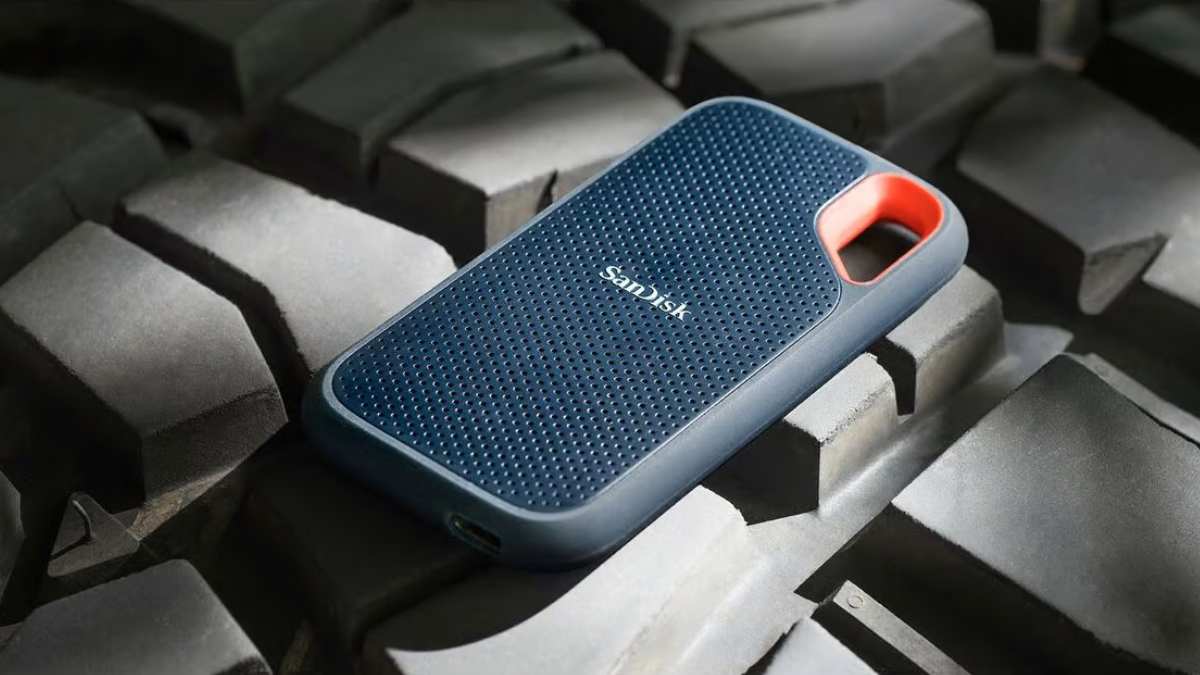
Many SanDisk external SSDs feature compact designs that easily fit inside a backpack, laptop bag, or even a pocket.
Their portability makes them useful for people who regularly move between offices, schools, studios, and different work locations.
Durable Construction
Selected models are designed with protective features to help withstand everyday handling. Depending on the product, these may include shock resistance, water resistance, dust protection, or rugged exterior materials.
Users should check the specific model’s protection rating rather than assuming every SanDisk SSD has the same level of durability.
Large Storage Capacities
SanDisk offers SSDs in different capacities to accommodate various storage requirements. Depending on the product family, buyers may find options ranging from smaller capacities for everyday files to several terabytes for large media libraries and professional projects.
Easy Connectivity
Many external SanDisk SSDs use USB-C or USB-compatible connections, making them convenient for transferring files between supported computers and other devices.
Compatibility and maximum transfer speeds depend on the drive, cable, device, and USB interface being used.
Popular SanDisk SSD Models
They offers several SSD product lines designed for different users and storage requirements. Understanding their differences can help you choose the right option.
SanDisk Extreme Portable SSD
Designed for users who need fast, convenient, and portable storage. It is suitable for photographers, travelers, students, and professionals who frequently transfer large files.
SanDisk Extreme PRO Portable SSD
A performance-oriented portable storage option for demanding workflows. It is particularly useful for professionals handling large photographs, videos, and other data-intensive projects.
An internal SATA SSD designed for compatible desktop computers and laptops. It can help improve system responsiveness and reduce loading times compared with older mechanical hard drives.
SanDisk Professional PRO-G40 SSD
Designed for professional users who need high-performance external storage for demanding creative workflows, including large media files and video production.
Before purchasing, check the product’s availability, connection type, storage capacity, and compatibility with your computer.
Benefits of Using a SanDisk SSD
Choosing can provide several advantages for everyday computing and professional work.
Faster Computer Performance
Replacing an older mechanical hard drive with a compatible SSD can significantly improve a computer’s responsiveness. Operating systems can start faster, applications can load more quickly, and files can become accessible with less waiting time.
Convenient File Transfers
External SSDs make moving large files between devices easier. Instead of relying entirely on cloud storage or slower external hard drives, users can transfer documents, videos, photographs, and other files using a portable storage device.
Reliable Everyday Storage
Because SSDs do not contain traditional spinning disks, they have fewer moving mechanical components than HDDs. This makes them convenient for portable use and helps reduce the risk of damage from ordinary movement.
However, SSDs can still fail, so important files should always have separate backups.
Quiet Operation
They operate electronically without the spinning noise associated with traditional mechanical hard drives. This makes them suitable for quiet workspaces, home offices, and recording environments.
Space-Saving Design
Many portable SanDisk SSDs are small and lightweight. Users can carry substantial amounts of digital information without bringing bulky storage equipment.
Who Should Use a SanDisk SSD?
It can benefit different types of users depending on their storage requirements.
-
Students: Store school projects, presentations, research documents, photographs, and other educational files.
-
Office professionals: Keep important documents, spreadsheets, presentations, and work-related files accessible.
-
Photographers: Transfer and organize large image collections from cameras and computers.
-
Videographers: Store video recordings, editing projects, and creative media files.
-
Gamers: Use compatible SSDs for additional game storage and potentially faster loading times, depending on the system.
-
Travelers: Carry important digital files without depending on an internet connection.
-
Everyday computer users: Expand available storage and create convenient backups of personal information.
For professionals working with large video files, higher-performance models may be more appropriate. Meanwhile, students and casual users may find a standard portable SSD sufficient for everyday storage.
SanDisk SSD vs. Traditional Hard Disk Drive
When choosing a storage device, many buyers compare SSDs with traditional HDDs.
| Feature |
SanDisk SSD |
Traditional HDD |
| Speed |
Generally faster |
Generally slower |
| Moving parts |
None |
Mechanical components |
| Noise |
Silent |
May produce noise |
| Portability |
Often compact |
Varies by model |
| Shock resistance |
Generally better |
More vulnerable to physical impact |
| Cost per GB |
Usually higher |
Usually lower |
The biggest advantage of an SSD is speed. It can improve computer responsiveness and make file transfers more convenient.
However, traditional hard drives can still be useful when users need large amounts of storage at a lower purchase cost.
The best choice depends on your priorities. If performance and portability are important, an SSD is worth considering. If affordable high-capacity storage is your main concern, an HDD may still be practical.
How to Choose the Right SanDisk SSD
Choosing the right SSD requires understanding your storage needs and the technical specifications of the product.
Here are some important factors to consider before purchasing:
Storage Capacity
Think about how much information you plan to store. Smaller capacities may be sufficient for documents and everyday files, while larger capacities are more suitable for video editing, photography, gaming, and extensive backups.
Read and Write Speeds
Read speed determines how quickly information can be accessed, while write speed affects how quickly files can be saved.
If you frequently transfer large videos or work with high-resolution photographs, consider a model with higher read and write speeds.
Connection Type
Check whether the SSD uses USB-C, USB-A compatibility, SATA, or another connection interface. Make sure your computer or device supports the required connection.
Device Compatibility
Not every SSD works with every device without additional setup. Check operating system support, file system requirements, and compatibility with smartphones, tablets, gaming consoles, or computers.
Price and Warranty
Compare prices, warranty coverage, and product specifications before making a purchase. Buying from authorized retailers can also help reduce the risk of counterfeit or unreliable storage products.
Tips for Maintaining Your SanDisk SSD
These are designed for convenient everyday use, proper handling and maintenance remain important.
-
Always eject safely: Use your device’s safe removal feature before disconnecting an external SSD to reduce the risk of interrupted file operations.
-
Keep it protected: Avoid dropping the drive or exposing it to conditions beyond its specified protection rating.
-
Maintain backups: Keep additional copies of important files on another storage device or a trusted backup service.
-
Avoid unnecessary disconnections: Disconnect the SSD properly, especially when transferring large amounts of data.
-
Update software when appropriate: Check for official firmware updates and recommended maintenance tools for your particular model.
-
Keep connectors clean: Protect USB ports and connectors from dust, moisture, and physical damage.
Following these practices can help maintain your SSD’s performance and extend its useful life.
This is worth considering for people who want faster, more convenient, and portable digital storage.
Its product range offers different solutions for casual users and professionals. Whether you need an external drive for everyday file transfers or a high-performance SSD for creative projects, there are several models to explore.
One of the most attractive advantages is the combination of compact designs and fast storage technology. Users can conveniently carry important files, organize digital content, and access information without relying entirely on internet-based storage.
However, buyers should consider their budgets and specific requirements. Not everyone needs an expensive professional SSD. A more affordable model may provide sufficient performance for documents, schoolwork, and ordinary file storage.
It is also important to remember that no storage device is completely immune to failure. Maintaining multiple copies of important information is always recommended.
Conclusion
A practical storage solution for people who need speed, portability, and convenient access to their digital files. With different product options available, they provides storage solutions for students, professionals, photographers, gamers, and everyday computer users.
From improving computer performance to simplifying large file transfers, SSD technology offers several advantages over traditional mechanical hard drives. Features such as compact construction, high-speed connectivity, and different storage capacities make a useful for various digital lifestyles.