most people spend several hours a day working on computers—whether for office tasks, studying, design work, or casual browsing. While keyboards often get attention in workspace setups, the mouse plays an equally important role in comfort and productivity. A poorly designed mouse can lead to wrist strain, fatigue, and reduced efficiency over time. This is where the Nulea wireless mouse enters the conversation.
They has become known for producing affordable ergonomic peripherals, especially vertical mice and trackball designs that prioritize comfort over flashy features. While it may not compete with premium brands in terms of build refinement or gaming performance, it offers something many users actually need: a more natural, wrist-friendly way to work.
🖱️ What is the Nulea Wireless Mouse?
A series of computer mice designed primarily for ergonomic comfort and productivity. Unlike traditional flat mice, many Nulea models feature a vertical design or trackball control system, which reduces strain on the wrist and forearm.
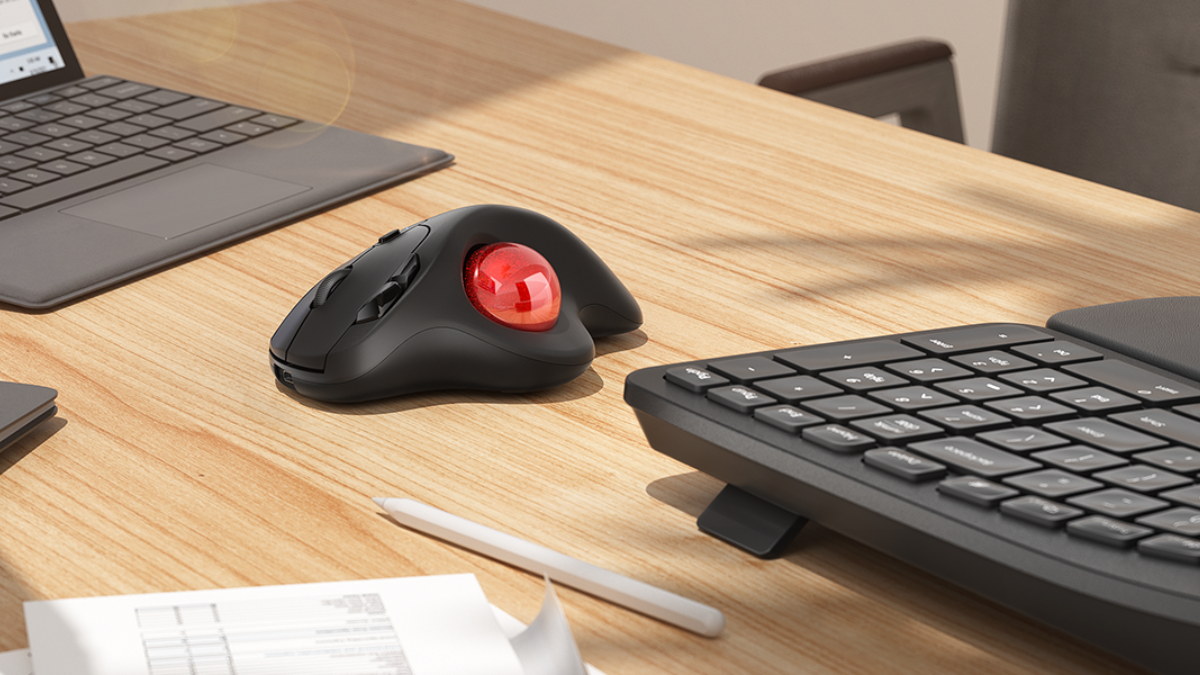
The vertical models are shaped like a handshake position, encouraging your hand to rest naturally instead of twisting downward. Meanwhile, trackball versions allow you to move the cursor using a stationary ball, reducing the need to move the entire mouse across the desk.
Most models connect via Bluetooth and/or 2.4GHz USB receivers, making them compatible with laptops, desktops, and even tablets.
🧠 Design Philosophy: Comfort First
The biggest selling point is ergonomics. Traditional mice force your wrist into a pronated position (flat and rotated), which can contribute to discomfort during long sessions. The design solves this by shifting your hand into a more natural resting angle.
Key design features include:
- Vertical “handshake” grip for reduced wrist strain
- Thumb-rest support for stability
- Lightweight build for easier control
- Silent-click buttons in many models
- Compact ergonomic footprint
For users who spend long hours at a computer, this design can significantly reduce fatigue compared to standard mice.
🔌 Connectivity and Compatibility
It support dual-mode connectivity:
- Bluetooth connection for laptops and tablets
- 2.4GHz USB receiver for stable desktop use
This flexibility allows users to switch between devices easily, which is especially useful for multitaskers or remote workers using multiple systems.
Setup is usually plug-and-play, meaning no complex software installation is required for basic use. This simplicity makes it accessible even for non-technical users.
⚙️ Performance and Sensitivity
These are not designed for gaming or high-end precision work, they perform well for everyday tasks such as:
- Office work (Excel, documents, emails)
- Web browsing
- Online learning
- Light creative tasks
Most models include adjustable DPI settings (commonly ranging from 800 to 2400 DPI), allowing users to control cursor speed based on preference.
However, it’s important to note that:
- It is not optimized for competitive gaming
- Precision-heavy design work may require higher-end devices
For general productivity, though, performance is more than sufficient.
🔋 Battery Life and Charging
Typically come with rechargeable batteries, which is a major convenience compared to older models that rely on disposable batteries.
Features often include:
- USB charging (usually via Type-C or micro-USB)
- Long standby time (days to weeks depending on usage)
- Auto-sleep mode to conserve power
This makes them practical for daily use without frequent interruptions for charging.
🧩 Different Types of Nulea Wireless Mouse
Offers more than one style of ergonomic mouse, allowing users to choose based on preference and workflow.
The most popular option, featuring a handshake grip.
✔ Best for wrist comfort
✔ Ideal for office work
✔ Easy learning curve
2. Trackball Mouse
Instead of moving the mouse, you move a ball with your thumb or finger.
✔ Great for small desks
✔ Minimal arm movement required
✔ Useful for precision navigation
3. Advanced Ergonomic Models
Some versions include extra DPI settings, multi-device switching, or enhanced grip textures.
✔ Better control options
✔ Slightly higher price
✔ Suitable for power users
👍 Advantages of Nulea Wireless Mouse
1. Ergonomic Benefits
The biggest advantage is reduced strain on the wrist and forearm. Over time, this can help users who experience discomfort from traditional mice.
2. Affordable Pricing
Compared to premium ergonomic brands, they offers similar design concepts at a lower cost, making it accessible to students and office workers.
Dual-mode connectivity allows clutter-free setups and easy switching between devices.
4. Simple Setup
No complicated software or drivers required for basic functionality.
5. Quiet Operation
Many models include silent click buttons, ideal for shared or quiet environments.
⚠️ Limitations to Consider
Despite its strengths, they has some trade-offs:
- Build quality feels more budget-oriented compared to premium brands
- Not suitable for high-performance gaming
- Trackball models may require a learning curve
- Limited advanced customization options
- Long-term durability may vary by model
These limitations are expected given its price range and target audience.
🧑💻 Who Should Use the Nulea Wireless Mouse?
This mouse is best suited for:
Office workers
People who spend long hours typing and navigating documents.
Students
Ideal for online classes, research, and assignments.
Perfect for home office setups focused on comfort and productivity.
Users with wrist discomfort
Especially those looking for a more ergonomic alternative to traditional mice.
🆚 How It Compares to Traditional Mice
Compared to standard flat mice, they offers:
- Better wrist alignment
- Reduced strain during long use
- More natural hand positioning
However, traditional mice may still be preferred for:
- Gaming performance
- Fine design work
- Users who prefer familiar layouts
In short, they prioritizes comfort over performance specialization.
🧠 Practical Tips Before Buying
If you’re considering, keep these tips in mind:
- Try vertical grip mentally first – it feels different at first
- Choose DPI flexibility if you switch tasks often
- Pick trackball only if you’re open to learning a new control style
- Check battery type and charging port for convenience
- Match size to hand comfort for best ergonomic benefit
🔚 Final Thoughts
This is not a premium, high-performance device—but it was never meant to be. Instead, it focuses on solving a very common problem: discomfort from prolonged computer use.
Its vertical and trackball designs provide a noticeable improvement in wrist comfort, especially for office workers, students, and remote professionals. While it may lack the refinement and advanced features of high-end brands, it compensates with affordability, simplicity, and ergonomic value.
In the end, the Nulea wireless mouse is best described as a practical upgrade rather than a luxury tool—one that makes everyday computing healthier and more comfortable without breaking the budget.